Sync in Place: How to Do Inventory Sync for Resellers in 2026
by Jasmin Mipaña •August 7, 2026

A reselling side hustle can be fun.There’s always the excitement of discovering new finds, and of course, the cha-ching of a completed order. But behind what seems to be an easygoing business is real hard work.
Part of inventory management is doing inventory sync for resellers, small and large alike. This step is important since resellers rarely sell on one platform only. You want to remove the sold listing as soon as it sells on one platform, to avoid double selling.
Here’s exactly how you can do inventory sync for resellers, step by step.
Before you start—what to know about inventory sync for resellers
- Inventory sync can be done manually, with inventory management software, or a combination of the two.
- When using inventory management software, real-time sync (delisting on all platforms as soon as an item is sold), listing capacity, multi-platform integration, and a good UI are features to watch.
- Manual inventory sync works best for casual sellers that sell on three platforms or less.
- The goal is to save time updating inventory and avoid errors.
How to do inventory sync for resellers
Inventory sync means updating your listings across all marketplaces where you sell. A sync should happen if an item sells, its stocks are almost running out, or when taken off the market.
For example, if your item is listed on Facebook Marketplace, Poshmark and Depop, then gets sold on Depop, you'll have to remove your listing (delist) from other marketplaces. Or if you have one more item added to your silk blouses collection, you have to update your listings that you have more items.
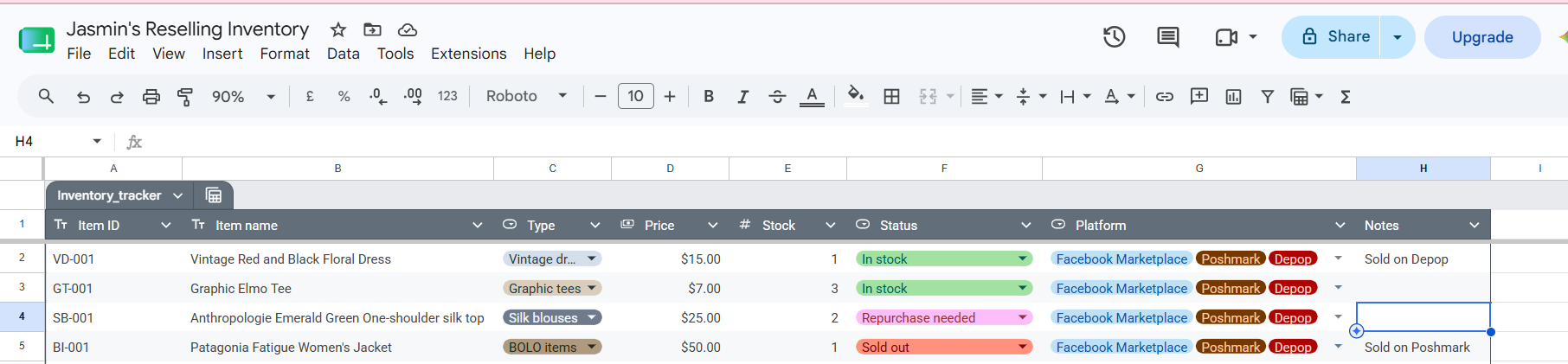
My attempt at a manual spreadsheet—for illustrative purposes only.
Manual inventory sync using a spreadsheet
Step 1: Open a spreadsheet of your choice.
Excel or Google Sheets is fine.
Step 2: Build your inventory tracker.
Google Sheets’ AI-enhanced tables make this easy. Enter the following in the columns: item ID (SKU), your listing name, categories, price, stock number, status, platform sold on, and remarks/notes.
Step 3. Customize columns
Add other columns as necessary, tweak the labels and change column types as needed.
Step 4:Sync inventory manually
Update status when items sell, when inventory runs out, new inventory is added or existing inventory is replenished.
Resellers can make their own custom spreadsheets, or buy from digital product sellers (Etsy sells a lot of these trackers).
Inventory Sync using an inventory management app or service

Inventory sync varies across services. Many emphasize features like automatic crosslisting, the ability to track different prices by platform, delisting, profit tracker across all platforms, among others. Here’s how to sync inventory using an inventory management app or software, in general:
Step 1: Purchase a subscription to an inventory management tool
Choose the one that fits your budget, has your must-have features, and an easy-to-use interface.
Step 2: Upload your listings.
This step will look different for crosslisting and inventory apps.
Step 3: Choose the platforms where you sell your inventory.
Here you can adjust pricing per platform (if your inventory management app allows this), choose where to sell and where to skip.
Step 4: Monitor sales and delisted items
Even if a service claims to delist sold items real-time, it pays to check that everything is in sync.
Step 5: Join communities and forums that teach how to use the app
Connect with fellow resellers and find ways to use the app’s features to its full potential. Also, don’t forget to keep in touch with customer service. They’re usually more than willing to help.
Before subscribing to an inventory management system, it pays to ask these questions:
- What is the number one inventory syncing issue you want solved?
- How many marketplaces do you plan to crosslist on?
- Does a certain app cover most, if not all of the features you want? If not, consider alternatives.
- How much are you comfortable paying for a service?
Frequently asked questions
Q: Is an inventory management system and a crosslisting service the same?
A: No. Inventory management and crosslisting are different functions, but many tools frequently have both features integrated. While crosslisting improves visibility across several platforms, inventory management helps you track how much inventory is sold, how many items are left unsold for months, which items are selling quickly, and which items need to be replenished.
Q: In inventory sync, which is better, manual or using a service?
A: It depends on the reseller’s needs. Like crosslisting vs manual listing, there are specific perks when using a manual spreadsheet (even a notebook!) or using software tools. It also depends on the reseller's business scale (newbie or knowledgeable, has 1-10 items versus thousands of inventory).
Q: What should I look for first in an inventory sync software?
A: Real-time syncing is the feature that will solve most issues arising from crosslisting and inventory management. When a reseller knows that a delisted item is removed from all crosslisted platforms, there is less risk of double selling.
Related articles
If you’re looking for more articles about reseller inventory, these might help:
How to Source Inventory for Reselling
Where to Buy Wholesale Inventory in 2026: Reseller Edition
How to Avoid Double Selling for Resellers in 2026
Reselling across different platforms means your listings get wide exposure to buyers. SellRaze makes the listing process under 30 seconds, letting you crosslist immediately and sell efficiently.